
Zoom technical information
About which version of Zoom that is required for use.
Check the Zoom client version
When using Zoom with your KTH account on a private platform, you need to check and upgrade to the correct version of Zoom yourself.
After Aug. 31, 2026, Zoom will not work unless you are using one of the following (or later) versions depending on your platform:
- Windows 7.1.5
- macOS 7.1.5
- VDI Client 7.0.11
- Linux 7.1.5
- iOS / iPadOS 7.1.5
- Android 7.1.5
*Please note that this does not apply to users of KTH platform computers KTH Windows, KTH Mac and KTH Ubuntu where the Zoom client is updated automatically.
**If you work at home, you need to connect to VPN for Software Center to update the client on your KTH Windows computer.
How to check Zoom client version
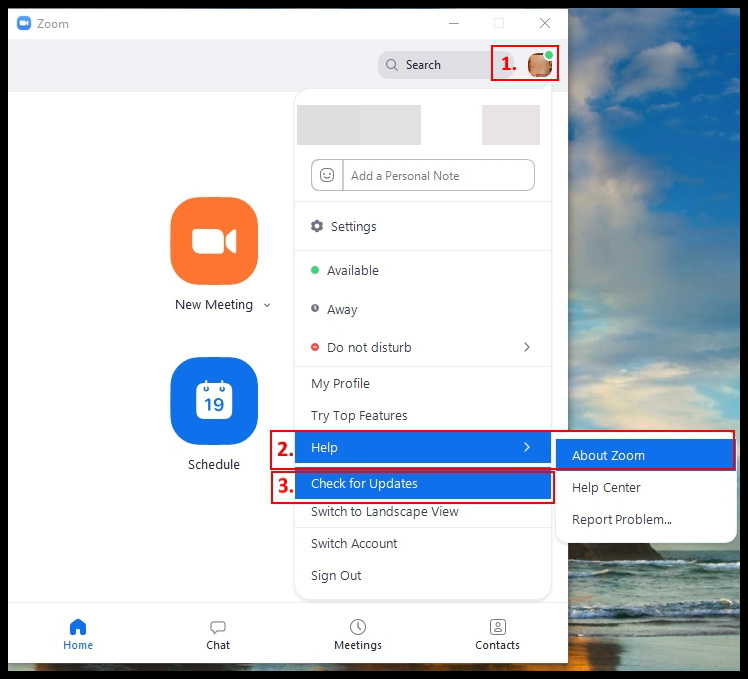
- Start Zoom click on your "profile" (top right corner)
- To check which version you have click on "Help" and then choose "About Zoom Workplace"
- To update Zoom click on "Check for Updates"
For latest zoom update here
When to use Zoom
- In webinars, interactive online presentations with up to 300 participants.
- For shorter presentations, seminars and tutoring.
- Virtual group-rooms for students.
- Project meetings.
- When there is an advantage to be able to see each other's screens.
What you can do:
- Share screen, for presentations, video clips etc
- Chat
- Record meeting
- Polls
- "Breakout rooms" for discussions outside the main web meeting
KTH Zoom account
The advantage of using KTH's Zoom instance is:
- KTH address book with employees and Zoom rooms
- Outlook calendar plugin for easier meeting bookings
- Access to more meeting tools
For more information please contact KTH-IT-Support by sending an e-mail to “it-support” or call 08 790 6600