
Status indicators in SpeedGrader
Submission statuses in SpeedGrader make it possible to color-code students' submissions in Canvas. Statuses can be set automatically by Canvas or manually by the teacher in SpeedGrader. A submission's status is displayed through both color and text in the Gradebook and is visible to both teachers and students.
What is a Submission Status?
A submission status is a visual color-coded indicator used to show the status of a submission in Canvas. It helps teachers organize and track submissions throughout a course.
Submission statuses do not affect assessment, grades, or assignment results. They are used solely to provide information about the status of a submission and to make it easier to navigate and sort submissions in the Gradebook. Some statuses are assigned automatically by Canvas (for example, late submissions), while others can be selected manually by teachers.
Change the Status of a Submission
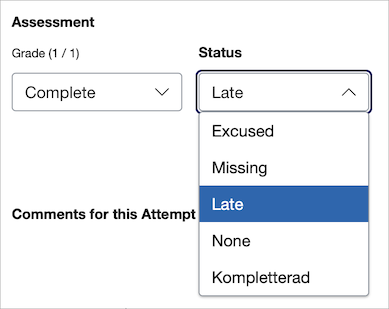
You can change the status of a submission directly in SpeedGrader. Open the relevant submission and select the desired status from the list. You can also change the status directly in the Gradebook. Using statuses consistently can facilitate assessment, follow-up, and communication with students throughout the course.
Status Options

In the Gradebook, different statuses are displayed using different colors. At KTH, four statuses can be used by teachers to mark student submissions: Late, Missing, Excused, and Kompletterad (in Swedish only). Each status is represented by its own color in the Gradebook.
-
Late (blue): Used for submissions submitted after the due date. This status is usually assigned automatically by Canvas when a student submits an assignment after the deadline, but it can also be selected manually by the teacher
-
Missing (red): Used when a student has not submitted an assignment even though the due date has passed. This status helps teachers quickly identify students who have not yet completed the activity.
-
Excused (yellow): Used when a student is not expected to submit the assignment. An excused assignment does not affect the student's results in the same way as a missing submission.
-
Kompletterad (in Swedish only, purple): Used to indicate that a student has submitted a revised version of an assignment, usually after receiving feedback from a teacher. This status can be used to distinguish revised submissions from new or regular submissions. The status "Kompletterad" is only stated in Swedish, but it is available to use in both Swedish and English course rooms.
The Resubmitted (pink) status is assigned automatically by Canvas when a new submission has been made for an assignment. Teachers cannot manually select this status.
Read more about how to change a status in Canvas (community.instructure.com) .