Register VAT for EU project in KTH-Expense
For EU projects, foreign VAT may not be included in EU project accounting. Therefore, the foreign VAT must be reported separately with a special expense type ”VAT EU project” when you register your expense.
When you register your expense, do the following:
-
Scan the receipt using the app or register a new expense and attach a scanned receipt
-
The system interprets the receipt
-
Check that all required fields are filled in
-
Select project
-
Tap ”Split receipt” at the bottom of the page
-
Enter a description
-
Select the expense category “VAT EU project”
-
Enter the foreign VAT in the field “Amount incl. VAT” – Note: do not enter anything in the field “VAT”
-
Select cost center and project
-
Select approver
-
Save
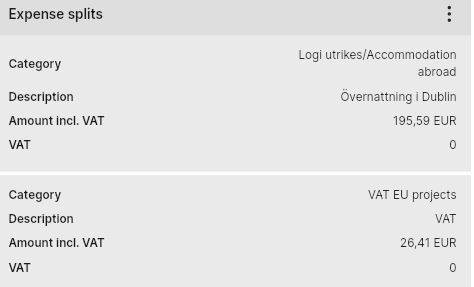
Your expense now consists of two expense categories:
-
The first, e.g. Hotel abroad, with the amount excluding the foreign VAT
-
The second, VAT EU project, with the foreign VAT amount.
Here is an example of what a split receipt looks like: